
We accept a bizarre amount of friction simply because everyone else does.
Take the online schedule. You post an event: “Live at 8:00 PM EST.” Immediately, your entire audience is forced to perform localized mental gymnastics—calculating offsets, guessing daylight savings, and hoping they did the math right.
We treat this cognitive load as a fixed rule of doing business online. It is a faulty logic. We are accepting a mediocre system that forces human beings to act like calculators.
What if the system just adapted to the observer?
Tools like Discord solved this years ago with dynamic timestamps. You type one snippet of code and every single person sees the correct date time in their own local timezone. No math. No friction.
It was time to stop accepting this unhelpful default, so I engineered a lightweight of code snippet that brings Discord’s exact timestamp functionality directly to your own site.
This does the work for you and it’s completely free to use. Stop letting your audience trip over administrative stones just to figure out what time to show up.
Using It On Your Website
The beauty of this system is its simplicity. Once the script is running on your site, you don’t have to manage it anymore. You simply use the standard Discord-style syntax anywhere you want a localized time to appear. Whether you are building a “Vote for a Time” poll or specifying the time of an event you’re hosting, you just type the tag and the code handles the rest.
The datetime will instantly shift to the true local time for every single visitor, dictated by their own browser’s understanding of exactly where they are on the planet. No more math, no more “GMT-6” confusion, and no more missed appointments. It is a set-it-and-forget-it solution for a borderless audience.
<t:704310420:F> (Discord style datetime)
Translates to
Sunday, April 26, 1992 at 12:47 PM Central Standard Time


{t:704310420:F} (modified Discord style datetime)
Translates to
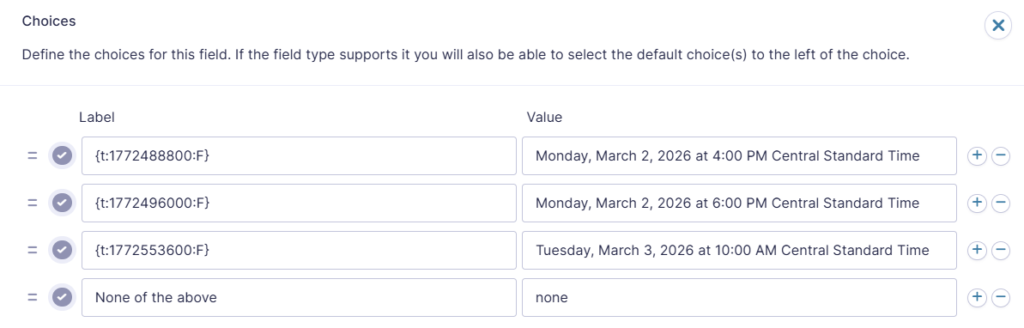
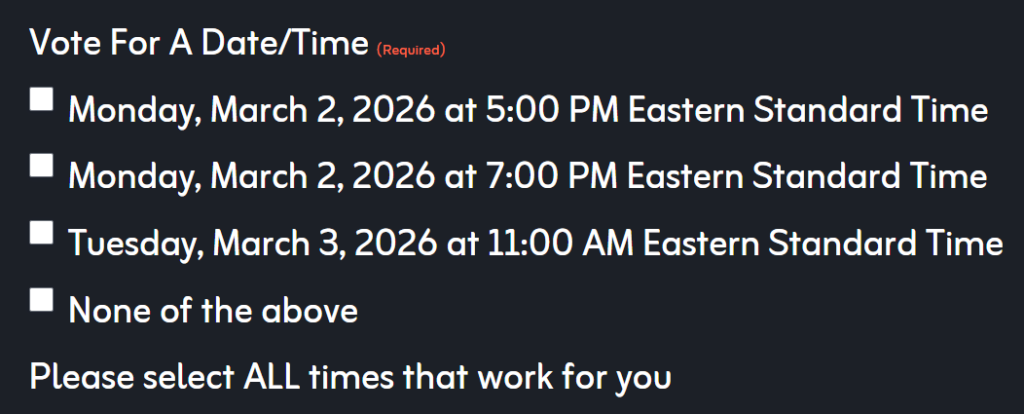
Sunday, April 26, 1992 at 12:47 PM Central Standard TimeBelow are screenshots of how I set up a Gravity Form for voting on an event time. I set the LABEL of the option to be the timestamp code so that it will autoconvert for all visitors. I set the VALUE of the option to be the human readable datetime in my timezone so that when I review form submissions, I see the human readable datetime, ie “Monday, March 2, 2026 at 4:00 PM Central Standard Time”.
Form Configuration:
Displayed Form:
The Code (Free to Use)
Copy the code block below and inject it into the footer of your website (or use a plugin like WPCode if you are on WordPress).
/*
 * Universal Discord Timestamp Converter (Full Named Timezones)
 * Supports: <t:TIMESTAMP:FLAG> AND {t:TIMESTAMP:FLAG}
 * Displays "Central Standard Time" instead of "GMT-6"
 *
 * * Built by Andrew James Creative (AJC)
 * For more systems and strategic digital design, visit: https://andrewjamescreative.com
 * * Free to use and modify.
 */
(function() {
	'use strict';

	function getFormatOptions(style) {
		const tzDisplay = 'long';
		const styles = {
			't': { hour: 'numeric', minute: 'numeric', timeZoneName: tzDisplay },
			'T': { hour: 'numeric', minute: 'numeric', second: 'numeric', timeZoneName: tzDisplay },
			'd': { year: 'numeric', month: 'numeric', day: 'numeric' },
			'D': { year: 'numeric', month: 'long', day: 'numeric' },
			'f': { year: 'numeric', month: 'long', day: 'numeric', hour: 'numeric', minute: 'numeric', timeZoneName: tzDisplay },
			'F': { weekday: 'long', year: 'numeric', month: 'long', day: 'numeric', hour: 'numeric', minute: 'numeric', timeZoneName: tzDisplay },
		};
		return styles[style] || styles['F'];
	}

	function getRelativeTime(timestamp) {
		const now = Math.floor(Date.now() / 1000);
		const diff = timestamp - now;
		const isFuture = diff > 0;
		const absDiff = Math.abs(diff);
		const rtf = new Intl.RelativeTimeFormat(undefined, { numeric: 'auto' });

		if (absDiff < 60) return rtf.format(isFuture ? absDiff : -absDiff, 'second');
		if (absDiff < 3600) return rtf.format(isFuture ? Math.round(diff / 60) : -Math.round(absDiff / 60), 'minute');
		if (absDiff < 86400) return rtf.format(isFuture ? Math.round(diff / 3600) : -Math.round(absDiff / 3600), 'hour');
		if (absDiff < 2592000) return rtf.format(isFuture ? Math.round(diff / 86400) : -Math.round(absDiff / 86400), 'day');
		if (absDiff < 31536000) return rtf.format(isFuture ? Math.round(diff / 2592000) : -Math.round(absDiff / 2592000), 'month');
		return rtf.format(isFuture ? Math.round(diff / 31536000) : -Math.round(absDiff / 31536000), 'year');
	}

	function convertDiscordTimes(context = document.body) {
		if (document.body.classList.contains('wp-admin') ||
				document.querySelector('.edit-post-layout') ||
				document.querySelector('.block-editor-page') ||
				window.location.href.includes('post.php')) {
			return;
		}

		if (context.textContent.indexOf('t:') === -1) return;

		const walker = document.createTreeWalker(context, NodeFilter.SHOW_TEXT, null, false);
		const regex = /([<{]|<)t:(\d+):([FfDdTtRr])([>}]|>)/g;
		let node;
		const nodesToUpdate = [];

		while (node = walker.nextNode()) {
			let isForbidden = false;
			let current = node.parentNode;

			while (current && current !== document.body) {
				const tag = current.tagName ? current.tagName.toLowerCase() : '';
				const classes = current.classList;

				if (tag === 'code' || tag === 'pre' || tag === 'textarea' || tag === 'script' || tag === 'style' ||
						classes.contains('wp-block-code') ||
						classes.contains('discord-timestamp') ||
						current.getAttribute('contenteditable') === 'true') {
					isForbidden = true;
					break;
				}
				current = current.parentNode;
			}

			if (isForbidden) continue;

			regex.lastIndex = 0;
			if (regex.test(node.nodeValue)) {
				nodesToUpdate.push(node);
			}
		}

		nodesToUpdate.forEach(textNode => {
			const originalText = textNode.nodeValue;
			const parent = textNode.parentNode;
			if (!parent) return;

			const newHTML = originalText.replace(regex, (match, open, timestampStr, styleFlag, close) => {
				const timestamp = parseInt(timestampStr);
				let formattedTime = '';

				if (styleFlag === 'R' || styleFlag === 'r') {
					formattedTime = getRelativeTime(timestamp);
				} else {
					const date = new Date(timestamp * 1000);
					const options = getFormatOptions(styleFlag);
					formattedTime = date.toLocaleString(undefined, options);
				}
				return `<span class="discord-timestamp" data-timestamp="${timestamp}" data-format="${styleFlag}">${formattedTime}</span>`;
			});

			if (newHTML !== originalText) {
				const tempWrapper = document.createElement('span');
				tempWrapper.innerHTML = newHTML;
				while (tempWrapper.firstChild) {
					parent.insertBefore(tempWrapper.firstChild, textNode);
				}
				parent.removeChild(textNode);
			}
		});
	}

	document.addEventListener("DOMContentLoaded", () => convertDiscordTimes());

	if (typeof jQuery !== 'undefined') {
		jQuery(document).on('gform_post_render', (e, id) => {
			const wrap = document.getElementById('gform_wrapper_' + id);
			convertDiscordTimes(wrap || document.body);
		});
	}
})();
How to Use It
Once the code is on your site, you can type timestamps directly into your text editor, forms, blog posts, or event pages.
The script supports both standard brackets <t:TIMESTAMP:FLAG> and curly braces {t:TIMESTAMP:FLAG} (helpful if your website builder strips out HTML tags).
The Flags:
tShort Time (8:00 PM Central Standard Time)TLong Time (8:00:00 PM Central Standard Time)dShort Date (11/25/2025)DLong Date (November 25, 2025)fShort Date/Time (November 25, 2025 at 8:00 PM Central Standard Time)FLong Date/Time (Tuesday, November 25, 2025 at 8:00 PM Central Standard Time)RRelative Time (in 3 days, 2 hours ago)
Need to generate a timestamp quickly? Use a free tool like discordtimestamp.com to grab the exact code for your date and time, then just paste it into your site.
Discover Your Own Workflows
This snippet is just a unit of a much larger philosophy. It’s what I do at Andrew James Creative. I look at the places where your creative or business systems are forcing you to play small and we replace that brute force with an adaptive ecosystem.
Whether you are a business trying to eliminate wasted effort or an individual creator feeling blocked by your own process, the answer is rarely to try harder. The answer is to find the unconventional solutions already hidden in how you naturally work.
I don’t offer cookie-cutter guidance. I act as a narrative engineer and a creative copilot to help you debug your creative code. We embrace the “bad” ideas, dismantle the roadblocks, and build a system that flows.
Click here to schedule a FREE consultation with me!